Apps with strong UX design achieve up to 5x higher user retention than poorly designed competitors. For Dubai SMEs competing in a crowded mobile marketplace, understanding mobile app UX is no longer optional. This guide clarifies what mobile app UX truly means, dispels common misconceptions, and provides actionable frameworks to boost user engagement and drive measurable business results through better app experiences.
Table of Contents
- Understanding Mobile App UX: Definition And Core Components
- Why Mobile App UX Matters: Impact On User Engagement And Business Success
- Common Misconceptions About Mobile App UX
- Cultural Considerations: Tailoring Mobile App UX For Dubai’s SMEs
- Comparing UX And UI: A Framework To Evaluate Mobile App Design Effectiveness
- How To Improve Mobile App UX: Practical Frameworks And Best Practices For SMEs
- Case Studies: Success Stories Of Mobile App UX In Dubai SMEs
- Optimize Your Mobile App UX With Expert Dubai Web Design Services
Key takeaways
| Point | Details |
|---|---|
| Mobile app UX encompasses the complete user journey including usability, accessibility, performance, and emotional response. | It’s not just visual design but the entire experience users have interacting with your app. |
| Well-designed UX increases user engagement by 70% and retention rates up to 5x. | These improvements translate directly into higher conversions, loyalty, and competitive advantage. |
| Cultural adaptation in Dubai raises UX satisfaction by 40%. | Localizing for Dubai’s diverse population significantly improves adoption and user happiness. |
| UX differs from UI: UX covers the entire user journey while UI focuses on visual elements. | Confusing the two leads to ineffective strategies and higher abandonment rates. |
| Continuous UX improvement through iteration and testing yields 50% better usability outcomes. | Regular feedback loops and A/B testing are essential for sustained app success. |
Understanding mobile app UX: definition and core components
Mobile app UX represents the complete end-to-end experience users have when interacting with your application. It extends far beyond visual appeal to encompass every touchpoint, emotion, and interaction throughout the user journey.
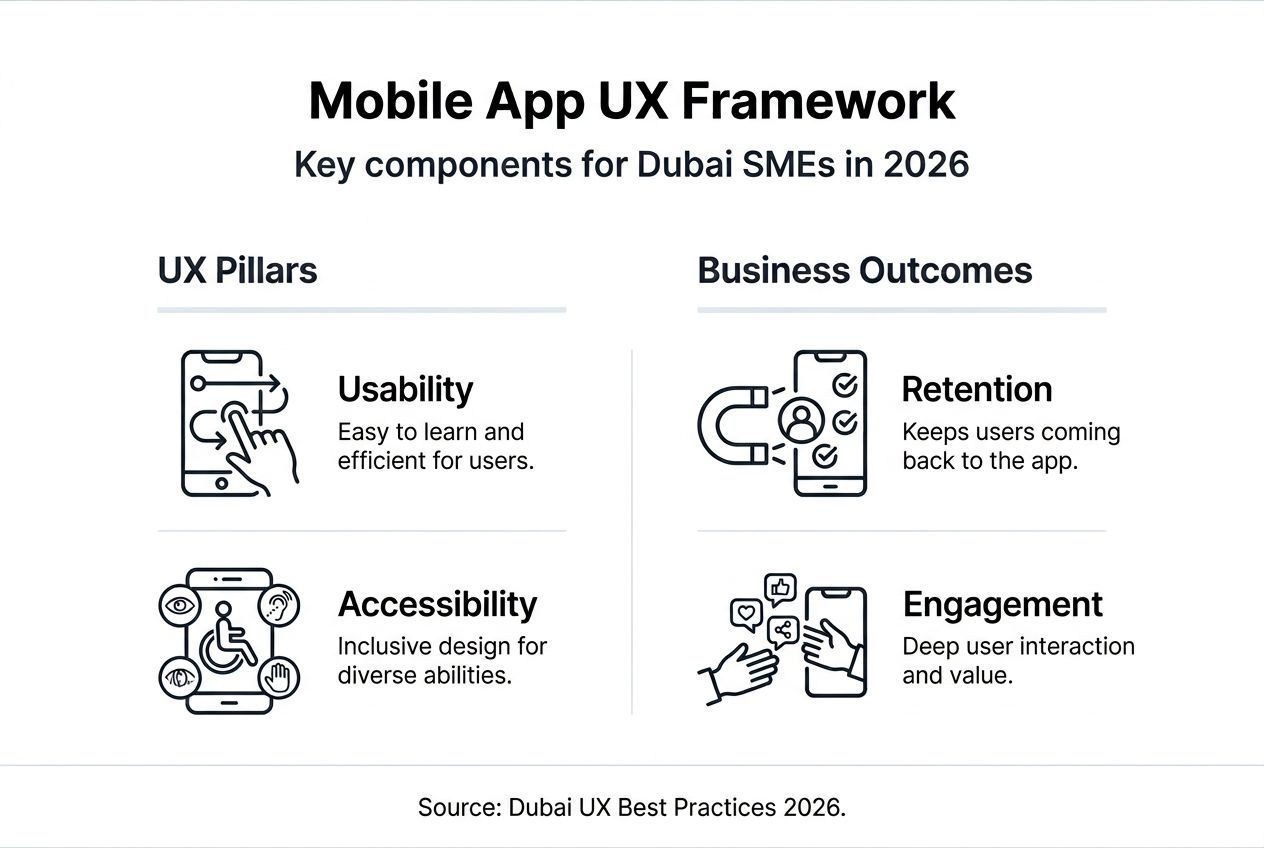
The definition of user experience includes four essential components that work together. Usability ensures users can accomplish tasks efficiently without confusion. Accessibility guarantees all users, regardless of ability, can navigate and use the app effectively. Performance delivers speed and reliability that meets user expectations. Emotional response creates positive feelings that encourage continued engagement.
Each component plays a critical role in business outcomes. Poor usability frustrates users and drives them to competitors. Lack of accessibility excludes potential customers and may violate regulations. Slow performance triggers immediate abandonment. Negative emotional responses prevent repeat usage.
Apps with superior UX see up to 5x higher user retention rates compared to those with poor UX. This dramatic difference directly impacts revenue, customer lifetime value, and market position. For Dubai SMEs operating in competitive sectors, these retention improvements can mean the difference between growth and stagnation.
Think of UX as the foundation supporting all other app features. Beautiful visuals mean nothing if users can’t complete basic tasks. Advanced functionality fails if the learning curve is too steep. Your app’s success depends entirely on how well users can achieve their goals while enjoying the process.
Why mobile app UX matters: impact on user engagement and business success
The connection between UX quality and business performance is direct and measurable. Companies investing in UX report a 70% increase in user engagement, which cascades into higher conversion rates, increased customer loyalty, and stronger competitive positioning.
For Dubai SMEs, engagement metrics translate to real business value. Active users spend more time in your app, complete more transactions, and recommend your service to others. They tolerate occasional issues better and provide valuable feedback for improvements. Most importantly, they generate predictable recurring revenue.
Consider how mobile app development benefits extend beyond initial launch. A retail app with intuitive navigation and quick checkout processes sees customers returning weekly instead of monthly. A service booking app that remembers preferences and simplifies rebooking converts one-time users into loyal clients. These improvements stem directly from thoughtful UX design.
Many Dubai business owners view UX as a cost rather than an investment. This perspective misses the bigger picture. Poor UX costs far more through lost customers, negative reviews, and wasted marketing spend attracting users who immediately leave. Strategic UX investment pays dividends through reduced support costs, higher customer lifetime value, and organic growth through referrals.
The competitive advantage from importance of user experience becomes especially pronounced in saturated markets. When multiple apps offer similar features, UX determines the winner. Users choose the app that makes their lives easier, even if competitors have more features or lower prices.
“Design is not just what it looks like and feels like. Design is how it works.” This principle applies perfectly to mobile app UX, where functionality and experience matter more than surface aesthetics.
Beyond aesthetics, UX streamlines interaction flows to minimize friction. Every extra tap, confusing label, or unclear navigation point costs you customers. Effective UX removes these obstacles, creating smooth paths from first open to desired action.
Common misconceptions about mobile app UX
The most damaging misconception treats UX and UI as interchangeable terms. While UI focuses on visual design elements like colors, typography, and button styles, UX encompasses the entire problem-solving journey users experience. This confusion leads businesses to prioritize appearance over functionality.
Typical mistakes include equating beautiful interfaces with good UX. An app can look stunning while being nearly impossible to use. Conversely, simple, plain interfaces often deliver superior user experiences through clarity and efficiency. Visual polish matters, but only after fundamental UX problems are solved.
90% of businesses confuse UX with UI, leading to ineffective app strategies and 60% higher abandonment rates when UX beyond visuals is neglected. These statistics reveal how widespread misunderstanding creates competitive opportunities for SMEs who get it right.
The consequences of misconceptions manifest quickly. Users download your app, spend 30 seconds confused, then delete it and never return. Your marketing budget attracts people who immediately leave. Support tickets pile up from users unable to complete basic tasks. Revenue projections fail because conversion rates remain stubbornly low.
Another common myth suggests UX is relevant only for consumer apps. Business-to-business apps need equally strong UX because professionals have even less patience for inefficient tools. They evaluate apps based on how much time and frustration they save, making UX a critical business differentiator.
Understanding the difference between UX and UI prevents costly missteps. UI designers make apps look appealing. UX designers ensure apps solve problems efficiently. Both roles are essential, but UX must lead to ensure visual design supports rather than hinders usability.
Pro Tip: Educate all stakeholders including executives, developers, and marketers on core UX principles before starting app development. This shared understanding prevents conflicts and ensures everyone prioritizes user needs throughout the project.
Cultural considerations: tailoring mobile app UX for Dubai’s SMEs
Dubai’s multicultural population creates unique UX challenges and opportunities. Your app serves users from dozens of countries, each bringing different expectations, preferences, and interaction patterns. Generic global designs fail to resonate with this diverse audience.

Localized UX design in Dubai achieves 40% higher user satisfaction and adoption rates than generic global designs. This significant improvement comes from respecting cultural nuances in language, imagery, navigation preferences, and color symbolism.
Language considerations extend beyond simple translation. Arabic users expect right-to-left layouts with appropriately mirrored navigation elements. Text expansion in Arabic compared to English requires flexible designs that accommodate longer strings without breaking layouts. Supporting multiple languages seamlessly demonstrates respect for user preferences.
Imagery choices must reflect local sensibilities. Photos showing diverse, modest dress codes resonate better than generic stock images. Symbols and icons carry different meanings across cultures, so test thoroughly with representative user groups. Colors evoke different emotions and associations depending on cultural background.
Navigation preferences vary significantly. Some cultures prefer hierarchical menu structures while others favor flat, exploratory interfaces. Testing with local users reveals these preferences, allowing you to optimize flows for your specific audience. Accessibility needs also differ based on language complexity and reading direction.
Challenges in meeting varied cultural expectations include balancing competing preferences within a single interface. You cannot create separate apps for each culture, so smart compromises are necessary. The solution lies in flexible, adaptable designs that respect core cultural considerations while maintaining usability for everyone.
Opportunities to outperform competitors emerge when you invest in cultural impact on UX design. Most international competitors launch generic apps without local adaptation. Dubai SMEs who understand their market can deliver superior experiences that build strong local loyalty.
Practical approaches to cultural localization include:
- Conduct user research with diverse Dubai demographics to understand specific needs
- Hire local UX designers familiar with regional preferences and expectations
- Test prototypes with representative user groups before finalizing designs
- Support both Arabic and English with proper right-to-left and left-to-right layouts
- Use culturally appropriate imagery, colors, and symbols throughout the interface
- Accommodate local payment methods, address formats, and contact preferences
The benefits of culturally adapted mobile app development in Dubai compound over time. Users feel understood and valued, leading to stronger emotional connections with your brand. They recommend your app within their communities, driving organic growth. Following Dubai UX best practices positions your SME as locally focused rather than just another international service.
Comparing UX and UI: a framework to evaluate mobile app design effectiveness
Clear differentiation between UX and UI enables better app design decisions. UX encompasses strategy, research, and functionality while UI focuses on visual implementation of that strategy. Both are essential but serve different purposes in creating successful apps.
Four pillars form the foundation of mobile app UX evaluation framework. Usability measures how easily users accomplish tasks. Accessibility ensures all users can navigate regardless of abilities. Performance tracks speed, reliability, and technical execution. Emotional impact assesses user satisfaction and brand perception.
A comprehensive UX evaluation framework covering usability, accessibility, performance, and emotional impact improves identification of UX issues by 45%. This systematic approach reveals problems that informal reviews miss.
| Aspect | UX Focus | UI Focus | How They Interact |
|---|---|---|---|
| Purpose | Solve user problems efficiently | Present solutions visually | UX defines what to show, UI shows it beautifully |
| Scope | Entire user journey and experience | Visual design and interactive elements | UX creates structure, UI adds aesthetic appeal |
| Key Questions | Does it work? Is it useful? | Does it look good? Is it appealing? | Both must answer yes for success |
| Success Metrics | Task completion, time on task, error rates | Visual consistency, brand alignment | Combined metrics show overall app quality |
| Skills Required | Research, psychology, information architecture | Graphic design, visual hierarchy, branding | Collaboration between disciplines essential |
Applying this framework starts with usability testing. Watch real users attempt key tasks in your app. Note where they hesitate, make errors, or express frustration. These observations reveal UX problems that designers often miss because they know the app too well.
Accessibility audits identify barriers preventing some users from accessing your app. Check color contrast ratios, screen reader compatibility, touch target sizes, and keyboard navigation. Fixing accessibility issues expands your potential user base while often improving usability for everyone.
Performance monitoring tracks load times, response speeds, and crash rates. Users abandon apps that feel slow or unreliable, regardless of how beautiful they look. Technical performance is a core UX component that directly impacts user satisfaction and retention.
Emotional impact assessment requires gathering qualitative feedback. Survey users about how the app makes them feel. Do they trust it with sensitive information? Does it reduce or increase their stress? Positive emotional responses drive loyalty beyond functional satisfaction.
Pro Tip: Focus early UX assessments on usability and accessibility for biggest impact. These two pillars provide the foundation, while performance and emotional impact build on that base. Fix fundamental problems before polishing details.
How to improve mobile app UX: practical frameworks and best practices for SMEs
Continuous UX improvement follows a systematic process adaptable to any SME budget or timeline. Continuous UX iteration with user feedback and A/B testing leads to up to 50% better usability outcomes than static design.
The iterative UX design process creates a feedback loop that refines your app over time. Start with user research, iterate through wireframing and testing, implement culturally appropriate localization, then monitor ongoing performance. Each cycle builds on lessons learned.
-
Conduct user research to understand your target audience’s needs, pain points, and expectations. Interview existing and potential users. Observe how they currently solve problems your app addresses. Identify gaps between what they need and what competitors offer.
-
Create wireframes and prototypes focusing on core user flows and tasks. Strip away visual polish to focus purely on functionality and information architecture. Test these low-fidelity versions with users to validate your approach before investing in full development.
-
Run usability testing sessions with representative users from your target market. Give them specific tasks and watch silently as they attempt completion. Note every hesitation, error, and point of confusion. These observations are more valuable than any opinion or assumption.
-
Implement culturally appropriate localization for Dubai’s diverse user base. Adapt language, imagery, navigation patterns, and interaction models to local preferences. Test localized versions with native speakers and cultural representatives.
-
Monitor analytics and user behavior after launch to identify drop-off points and friction. Track which features users engage with and which they ignore. Use heatmaps to see where users tap and scroll. Quantitative data reveals problems qualitative research might miss.
-
Establish continuous feedback loops through in-app surveys, support channels, and app store reviews. Make it easy for users to report problems and suggest improvements. Respond to feedback promptly to show you value user input.
-
Run A/B tests comparing different approaches to key flows and features. Test one variable at a time to isolate what drives improvement. Let data rather than opinions guide design decisions.
-
Minimize cognitive load by simplifying choices and reducing information density. Every element on screen competes for attention. Remove anything that doesn’t directly support user goals. Use progressive disclosure to reveal complexity only when needed.
-
Ensure accessibility compliance with WCAG guidelines and local requirements. Make your app usable by people with visual, motor, hearing, and cognitive disabilities. Accessibility improvements benefit everyone through clearer interfaces and better usability.
-
Review and update your UX audit checklist quarterly to catch emerging issues before they impact significant user numbers. Regular audits prevent small problems from becoming major obstacles.
Partner with experienced UI UX design services in Dubai to accelerate improvements and avoid common pitfalls. Professional designers bring expertise, objectivity, and proven methodologies that internal teams often lack.
Pro Tip: Use analytics tools to track drop-offs and user behavior for targeted UX fixes. Focus improvements on areas where users struggle most rather than spreading resources across minor issues. Fixing the biggest problems delivers the most significant impact.
Case studies: success stories of mobile app UX in Dubai SMEs
Real-world examples demonstrate how UX improvements translate to business results. A Dubai-based retail app serving fashion-conscious millennials struggled with 70% user drop-off during checkout. After implementing a streamlined, culturally adapted checkout flow with multiple local payment options, they saw downloads increase 50% and active users rise 35% within three months.
Specific UX improvements included reducing checkout from seven steps to three, adding Arabic language support with proper right-to-left layout, and integrating popular local payment methods beyond credit cards. User testing revealed customers wanted to save favorite items and receive personalized recommendations based on browsing history.
Business impact extended beyond immediate metrics. Customer lifetime value increased 40% as improved UX encouraged repeat purchases. Support tickets decreased 55% because users could complete tasks without assistance. App store ratings improved from 3.2 to 4.6 stars, driving organic discovery through better rankings.
Another Dubai SME in the home services sector redesigned their booking app focusing on simplicity and transparency. They eliminated hidden fees, clarified service descriptions, and added real-time provider tracking. These changes increased completed bookings 60% and reduced cancellations 45%.
Lessons learned from these cases emphasize starting with user research rather than assumptions. Both companies initially designed apps based on what they thought users wanted. Only after observing real user behavior did they identify actual friction points. Testing with diverse user groups representing Dubai’s population revealed culturally specific preferences that generic designs missed.
Investment in professional Dubai mobile app development and partnering with a Dubai UI UX design agency accelerated improvements and prevented costly mistakes. Expert guidance helped prioritize changes delivering maximum impact while staying within budget constraints.
The competitive advantage from superior UX compounds over time. As more users experience your improved app, word-of-mouth referrals increase. Better app store ratings improve visibility in search results. Lower churn rates reduce customer acquisition costs. These benefits create a virtuous cycle where UX investment pays increasing returns.
Optimize your mobile app UX with expert Dubai web design services
Transforming your mobile app UX from adequate to exceptional requires specialized expertise and local market knowledge. Professional mobile application development in Dubai services understand the unique challenges and opportunities in this diverse, competitive market.
Expert audits identify UX problems you might miss internally. Fresh perspectives from experienced designers reveal friction points users experience but never report. Comprehensive evaluations using proven frameworks measure usability, accessibility, performance, and emotional impact systematically.
Partnering with a UI UX design agency in Dubai accelerates improvements through proven methodologies and cultural expertise. Agencies bring experience from multiple projects, allowing them to avoid common pitfalls and implement best practices efficiently.
Start by reviewing your current app performance against a comprehensive UX audit checklist. Identify quick wins that deliver immediate improvements alongside longer-term strategic enhancements. Prioritize changes based on user impact and implementation complexity.
Frequently asked questions
What is the difference between UX and UI in mobile apps?
UX encompasses the entire user experience including usability, accessibility, performance, and emotional response throughout the complete user journey. UI focuses specifically on visual design and interactive elements like buttons, colors, and typography. Businesses often confuse the two, risking poor engagement when focusing only on UI aesthetics while neglecting fundamental UX problems that prevent users from accomplishing their goals.
How can SMEs in Dubai tailor mobile app UX for local users?
By incorporating local languages with proper Arabic right-to-left layout, culturally appropriate imagery respecting local sensibilities, navigation preferences that match regional expectations, and accessibility features reflecting Dubai’s diverse population. Engaging local user feedback through testing with representative groups and implementing iterative UX improvements based on actual behavior patterns are essential for creating apps that resonate with Dubai’s multicultural market.
What are practical first steps to improve mobile app UX for a Dubai SME?
Start with user research to identify needs, pain points, and expectations through interviews and observation of how users currently solve problems. Design wireframes emphasizing usability and core task completion before adding visual polish. Follow with iterative testing using representative users from your target market, incorporating their feedback before launch. Establish continuous improvement processes with analytics monitoring and regular UX audits to maintain and enhance app performance over time.
Why does mobile app UX matter more than visual design?
UX determines whether users can accomplish their goals efficiently and enjoyably, directly impacting retention, engagement, and business success. Beautiful visual design attracts initial downloads but cannot compensate for poor usability, slow performance, or confusing navigation. Apps with superior UX see up to 5x higher retention rates and 70% better engagement regardless of visual sophistication, because functionality and ease of use drive long-term adoption more than aesthetics alone.
Recommended
- UI UX Design Agency in Dubai – Web Design Dubai – Website Design Company Dubai | NetSoft
- Why Mobile App Development Fuels Dubai Business Growth
- IOS App Development in Dubai – Web Design Dubai – Website Design Company Dubai | NetSoft
- Mobile Application Development in Dubai – Web Design Dubai – Website Design Company Dubai | NetSoft