TL;DR:
- Proper UI design guides user interaction, retention, and revenue, beyond just aesthetics.
- Dubai SMBs must prioritize clear, localized, and consistent interfaces for diverse users.
- Continuous testing and user feedback are essential for effective UI improvements.
Most Dubai business owners think UI design is about picking nice colors and making an app look polished. That assumption is costing them users. User interface design is actually the architecture of how people interact with your app, and when done right, it directly drives retention, conversions, and revenue. For small and medium-sized businesses in Dubai competing in one of the world’s most digitally active markets, understanding UI is not optional. This guide breaks down what UI really means, why it matters for your business, how it gets built, and what best practices will give your app a genuine edge in the UAE market.
Table of Contents
- What is UI in app development?
- Why UI matters for Dubai SMBs
- Core UI design process: From research to launch
- Best practices for impactful app UI in Dubai
- Our take: What most SMBs in Dubai miss about UI
- Ready to level up your app UI in Dubai?
- Frequently asked questions
Key Takeaways
| Point | Details |
|---|---|
| UI is more than visuals | Great app UI combines looks with usability for business results. |
| UI drives engagement | A strong user interface boosts app retention and satisfaction. |
| Design is a process | Effective UI requires user research, prototyping, testing, and iteration. |
| Local best practices matter | Dubai SMBs benefit from culturally relevant, user-centered UI design. |
What is UI in app development?
UI stands for user interface. In plain terms, it is everything a user sees and touches when they open your app. Every button they tap, every screen they scroll, every icon they recognize, and every color that guides their attention is part of the UI. UI in app development refers to the visual and interactive elements users see and interact with, including buttons, icons, layouts, colors, and typography, all focused on aesthetics and usability.
Think of your app as a physical store. The UI is the layout of the shelves, the signage, the lighting, and the checkout counter. If those elements are confusing or ugly, customers leave. If they are clear and inviting, customers stay and buy.
Core UI elements include:
- Buttons and calls to action: The interactive triggers that move users forward
- Icons and imagery: Visual shortcuts that communicate without words
- Layouts and grids: The structure that organizes content on screen
- Color palettes: Emotional and functional cues that guide attention
- Typography: Font choices that affect readability and brand tone
- Spacing and whitespace: The breathing room that prevents visual overload
One of the most common points of confusion for business owners is the difference between UI and UX. They are related but not the same.
| Aspect | UI (User Interface) | UX (User Experience) |
|---|---|---|
| Focus | Visual and interactive elements | Overall user journey and satisfaction |
| Scope | What users see and touch | How users feel using the product |
| Output | Screens, buttons, layouts | Flows, wireframes, research insights |
| Goal | Aesthetic appeal and usability | Ease of use and problem-solving |
For a deeper look at how these two disciplines work together, explore UX design explained and how understanding UI and UX roles can sharpen your digital strategy.
“Good UI is not decoration. It is the difference between a user completing a task and abandoning your app in frustration.”
Usability is the core job of UI. Beauty matters, but only when it serves clarity.
Why UI matters for Dubai SMBs
Now that you know what UI is, let’s see exactly why it matters for your Dubai-based business.
Dubai’s app market is intensely competitive. Users here are tech-savvy, multilingual, and have zero patience for clunky experiences. A more usable, appealing app drives higher engagement and satisfaction among users. That is not a design opinion. It is a business outcome.
Here is what strong UI directly improves for Dubai SMBs:
| Business metric | Impact of good UI |
|---|---|
| User retention | Reduces drop-off by making navigation intuitive |
| Conversion rate | Clear CTAs and layouts guide users toward purchases |
| Customer trust | Professional design signals credibility |
| Support costs | Fewer confused users means fewer support tickets |
| Brand perception | Consistent visuals reinforce brand identity |
Consider a Dubai-based retail SMB that redesigned its app checkout flow. By simplifying the button labels and reducing the steps from five to three, they saw a measurable jump in completed purchases. No new features. Just better UI.

Engagement statistics reinforce this pattern. Apps with well-structured, visually consistent interfaces see significantly higher session lengths and lower uninstall rates compared to apps with cluttered or inconsistent designs. For tips on boosting SMB engagement, the data consistently points back to UI clarity as the primary lever.
Dubai’s user base is uniquely diverse. Your app might be used by Emirati nationals, South Asian expats, European professionals, and Arab tourists all in the same week. That diversity demands a UI that is universally intuitive, not just locally familiar. Following UI/UX best practices built for multicultural audiences is a real competitive advantage here.
Pro Tip: Prioritize clarity over cleverness. A button that says “Book Now” outperforms a stylish icon with no label every time, especially for first-time users who may not share your cultural frame of reference.
Core UI design process: From research to launch
With the business benefits in mind, it’s crucial to understand how successful UI is actually created.
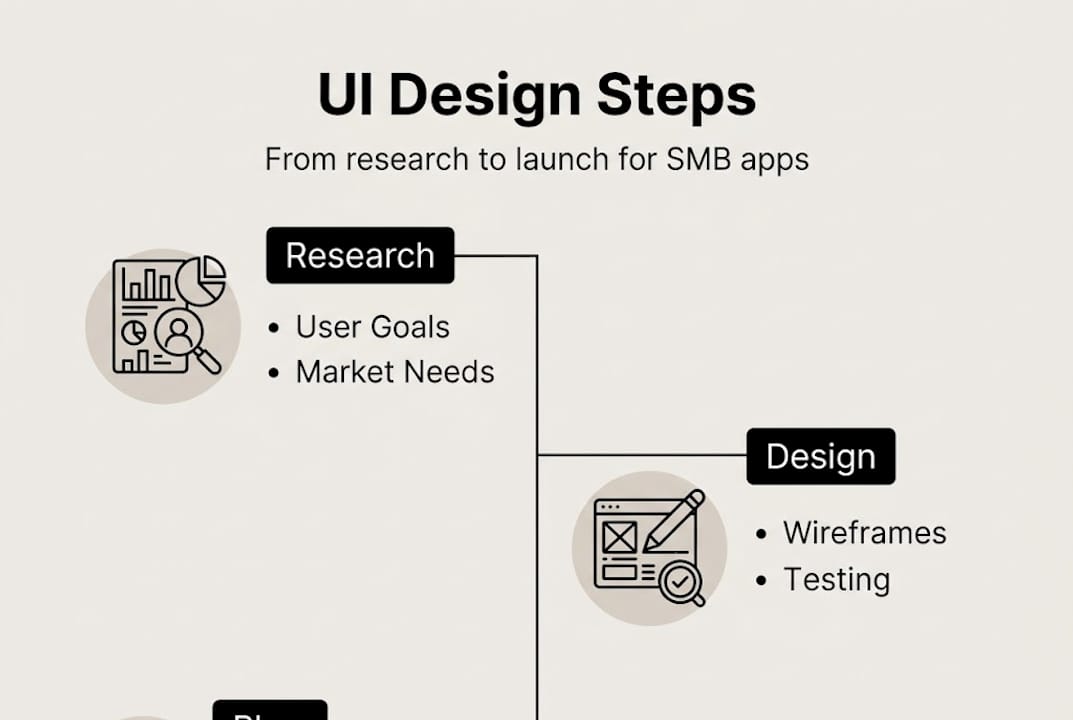
UI design is not a single creative session. It is a structured process. Key UI design methodologies include user research, wireframing, prototyping, visual design with design systems, usability testing, and iteration using Agile and Design Thinking processes.
Here is how each phase works in practice:
- User research: Before any design begins, you need to understand who your users are, what they need, and where they struggle. Surveys, interviews, and competitor analysis all feed this phase.
- Wireframing: A wireframe is a simple, low-fidelity sketch of your app’s screens. Think of it as the blueprint before construction. It maps out structure without visual polish.
- Prototyping: A prototype is a clickable, interactive version of your wireframe. It simulates the user experience so you can test flows before writing a single line of code.
- Visual design: This is where colors, typography, icons, and branding come together. Design systems, which are reusable component libraries, keep everything consistent across screens.
- Usability testing: Real users interact with the prototype. You observe where they hesitate, get confused, or drop off. This feedback is gold.
- Iteration: Based on testing results, you refine and improve. Then test again. Great UI is never finished on the first try.
Agile methodology keeps this process flexible, allowing teams to adjust quickly when user feedback reveals problems. The Design Thinking approach adds a human-centered lens, ensuring every design decision starts with empathy for the user.
Our team at DubaiWebCity’s UI design expertise applies this full process to every app project, ensuring nothing is guessed and everything is validated.
“Design is never done. The best apps are the ones that keep listening to their users and keep getting better.”
Pro Tip: Always test your prototype with at least five real users before development begins. You will catch critical usability issues at a fraction of the cost of fixing them post-launch.
Best practices for impactful app UI in Dubai
Equipped with the core process, here’s how to put UI design best practices into action, Dubai style.
UI must align with both aesthetic appeal and local usability requirements. In Dubai, that means designing for a fast, diverse, and demanding audience. Here is what that looks like in practice:
Simplicity and performance first
Cluttered screens kill engagement. Every element on a screen should earn its place. Fast load times are non-negotiable. Users in Dubai expect app responses in under two seconds. If your UI requires heavy animations or oversized images, optimize them.
Localization for Dubai’s audience
Support both Arabic and English. Arabic text reads right to left, which means your entire layout may need to mirror for Arabic users. This is called RTL (right-to-left) support, and it is a technical and design requirement, not an afterthought. Icons and imagery should also be culturally neutral where possible.
Visual consistency and branding
Every screen should feel like it belongs to the same app. Use a consistent color palette, font set, and button style throughout. Inconsistency signals unprofessionalism and erodes trust.
Avoid common pitfalls
The most frequent mistakes Dubai SMBs make in app UI include: too many fonts on one screen, icons without labels, buttons too small to tap comfortably on mobile, and overloading the home screen with every feature at once.
A practical checklist for your Dubai SMB app UI:
- Clear, labeled navigation with no more than five main menu items
- Minimum 44px tap targets for all interactive elements
- Arabic and English language toggle that adjusts layout direction
- Brand colors used consistently across all screens
- Loading states and error messages that explain what happened
- Tested on both iOS and Android at multiple screen sizes
For more actionable guidance on improving UI for engagement, the details matter more than you might expect.
Pro Tip: Run your app through a quick accessibility check. High color contrast and readable font sizes help all users, including those with visual impairments, and they are increasingly expected by UAE digital standards.
Our take: What most SMBs in Dubai miss about UI
Here is the uncomfortable truth we have seen after working with Dubai businesses since 2004. Most SMBs treat UI as a one-time deliverable. They commission a design, build the app, and move on. But UI is not a product you ship. It is a conversation you have with your users, continuously.
The businesses that win with their apps are not the ones with the most beautiful interfaces. They are the ones that obsessively track where users drop off, then fix it. They run small tests. They ask real customers what confuses them. They treat every negative review as a design brief.
Chasing design trends is another trap. A glassmorphism effect or a trendy dark mode does not solve a real user problem. It just looks current for six months. Invest that energy in understanding why users abandon your cart, or why they never find your best feature.
For context on how mobile app UX in Dubai connects to real business outcomes, the pattern is consistent: businesses that invest in user feedback loops outperform those that invest in visual polish alone. UI is your most direct line to your customer’s experience. Treat it like one.
Ready to level up your app UI in Dubai?
Building an app with strong UI takes more than good taste. It takes a structured process, local market knowledge, and the technical skills to bring it all together.
At DubaiWebCity, our mobile app development experts have been helping Dubai SMBs build apps that users actually enjoy using since 2004. We combine deep local experience with proven UI methodologies to deliver apps that perform. Whether you are starting from scratch or redesigning an existing app, our responsive UI design services are built to meet Dubai’s standards. Reach out today and let’s talk about what your app could become.
Frequently asked questions
What does UI mean in app development?
UI stands for user interface, which covers the visual and interactive elements of an app that users see and use, such as buttons, colors, layouts, and typography.
How is UI different from UX in apps?
UI focuses on the look and feel of individual screens, while UX covers the overall user journey, including ease of use, satisfaction, and how smoothly users move through the app.
Why is good UI important for Dubai SMBs?
A well-designed UI makes your app easy to use, and a usable, appealing app drives higher engagement and satisfaction, which translates directly into better retention and revenue.
What are the key steps in app UI design?
Key UI design steps include user research, wireframing, prototyping, visual design, usability testing, and iterating based on real user feedback.
What UI best practices should Dubai businesses follow?
Focus on clarity, fast performance, RTL language support for Arabic users, and consistent aesthetic and usability standards to serve Dubai’s diverse and demanding audience effectively.
Recommended
- IOS App Development in Dubai – Web Design Dubai – Website Design Company Dubai | NetSoft
- Mobile app development guide for Dubai SMEs 2026
- What is mobile app UX: a guide for Dubai SMEs in 2026 – Web Design Dubai – Website Design Company Dubai | NetSoft
- Mobile app development steps: A practical guide for UAE SMEs