Running a small business in Dubai means competing for attention on mobile screens. Your potential customers are browsing on phones during their commute, tablets at lunch, and desktops at work. If your website doesn’t adapt seamlessly to every device, you’re losing sales before visitors even see your products. A structured responsive website creation workflow eliminates guesswork and ensures your site delivers excellent experiences across all platforms. This guide walks you through each phase, from initial planning to final optimization, so your Dubai SMB can capture and convert mobile traffic effectively.
Table of Contents
- Key takeaways
- Preparing for responsive website creation
- Executing the responsive design and development phases
- Verifying and optimizing your responsive website
- Enhance your responsive website with professional web design services
- Frequently asked questions
Key Takeaways
| Point | Details |
|---|---|
| Responsive workflow | A structured workflow guides planning design development and testing to ensure a site works well on phones tablets and desktops. |
| Clear preparation phase | Defining business goals and audience helps shape design decisions and testing priorities before coding. |
| Device and breakpoint planning | Identify devices and screen sizes used by Dubai customers to set breakpoints and testing priorities. |
| Content prioritization | Plan mobile first by prioritizing value proposition primary call to action and contact details above the fold. |
Preparing for responsive website creation
Starting a responsive website project without proper preparation is like building a house without blueprints. You need clarity on what you’re building and who you’re building it for before writing a single line of code.
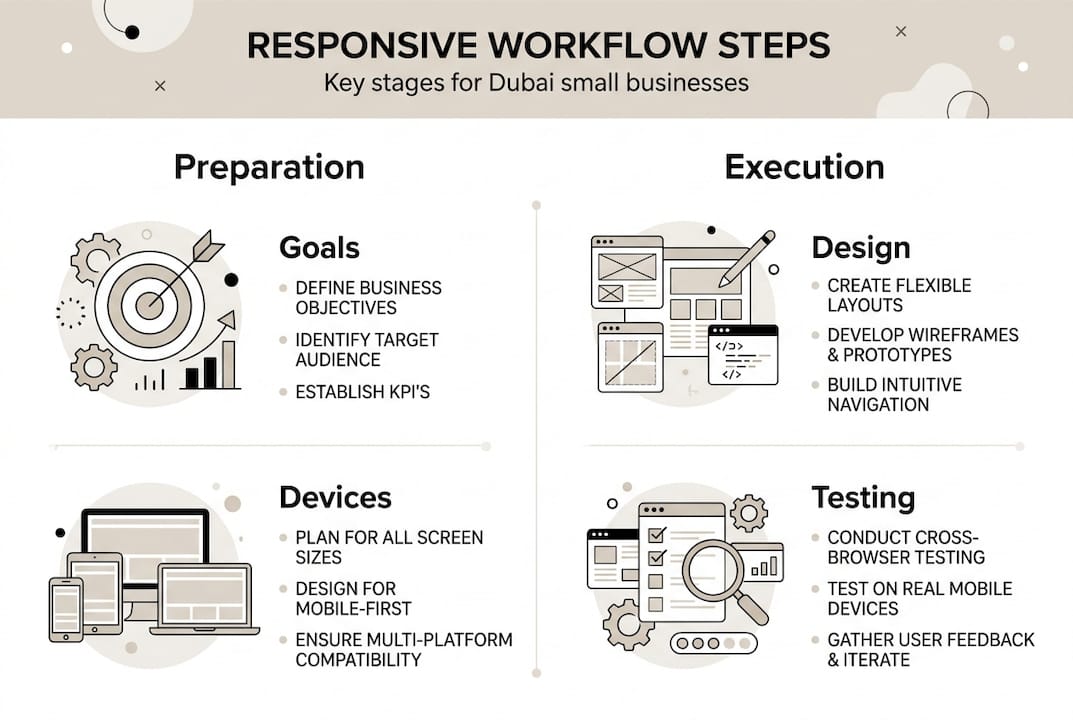
Begin by defining your business goals. Are you launching an e-commerce store, showcasing a portfolio, or generating service inquiries? Your objectives shape every design decision. A Dubai restaurant needs prominent reservation buttons and menu photos, while a consulting firm prioritizes contact forms and case studies. Write down three specific outcomes you want from your website, such as increasing online bookings by 40% or reducing customer service calls through better FAQ sections.
Next, identify the devices your customers actually use. Dubai’s tech-savvy population browses on the latest iPhones, Samsung Galaxies, and tablets. Check your existing analytics or industry reports to understand screen sizes and browsers. Most Dubai visitors use Chrome and Safari on devices ranging from 320px phone screens to 1920px desktop monitors. This data determines your breakpoint strategy and testing priorities.
Choosing the right tools accelerates development significantly. For design, Figma offers collaborative features perfect for getting stakeholder feedback quickly. Sketch works well for Mac-based teams. On the development side, frameworks like Bootstrap provide pre-built responsive components, while Tailwind CSS gives you more granular control over styling. A clear preparation phase improves the efficiency of responsive website projects, setting you up for smoother execution.
Content hierarchy planning often gets overlooked but proves critical for mobile success. Desktop screens accommodate sidebars, multiple columns, and extensive navigation menus. Mobile screens force you to prioritize ruthlessly. Map out which information matters most to visitors in their first five seconds. Your value proposition, primary call to action, and contact details should appear above the fold on every device.
Pro Tip: Create a simple spreadsheet listing every page element and assign it a priority from 1 to 5. On mobile layouts, only priority 1 and 2 items appear immediately visible, while lower priority content moves below the fold or into collapsed menus.
Here’s how different tools compare for responsive projects:
| Tool Category | Option A | Option B | Best For |
|---|---|---|---|
| Design Software | Figma | Adobe XD | Figma wins for team collaboration |
| CSS Framework | Bootstrap | Tailwind CSS | Bootstrap for speed, Tailwind for customization |
| Testing Platform | BrowserStack | Responsive Design Checker | BrowserStack for comprehensive device coverage |
| Performance Tool | Google Lighthouse | GTmetrix | Lighthouse for integrated audits |
Gathering requirements also means understanding your content volume. Will you have 10 pages or 100? Do you need a blog, product catalog, or member portal? These questions influence your choice between static HTML, WordPress, or custom CMS solutions. Dubai businesses often benefit from CMS platforms that allow easy updates without developer intervention, keeping content fresh as promotions and services evolve.
Executing the responsive design and development phases
With preparation complete, you’re ready to build. The execution phase transforms plans into functioning websites through systematic design and coding.
Start with wireframes that emphasize flexible layouts. Sketch basic page structures showing how content reflows from desktop three-column layouts to mobile single-column stacks. Use CSS Grid for complex two-dimensional layouts like product galleries, and Flexbox for simpler one-dimensional arrangements like navigation menus or feature lists. These modern layout tools eliminate the need for fixed-width containers and float-based hacks that plagued older responsive techniques.

Create interactive prototypes next. Tools like Figma and Adobe XD let you link artboards together, simulating navigation flows and interactions. Build prototypes for at least three breakpoints: mobile (375px), tablet (768px), and desktop (1440px). Show stakeholders how menus collapse into hamburger icons, how image galleries adapt, and how forms resize. Getting approval at the prototype stage prevents expensive revisions during development.
Now begins the actual coding, and here’s where mobile-first coding and iterative testing are best practices. Write your base CSS for mobile screens first, then use min-width media queries to add complexity for larger displays. This approach ensures your site works on the most constrained devices, then progressively enhances for tablets and desktops.
Here’s a typical mobile-first development sequence:
- Write semantic HTML markup with proper heading hierarchy and ARIA labels
- Style for 320px mobile screens using flexible units like percentages and rems
- Add tablet styles at 768px breakpoint, introducing multi-column layouts
- Enhance desktop experience at 1024px with sidebars and advanced features
- Test each breakpoint thoroughly before moving to the next
Framework selection impacts development speed and flexibility. Bootstrap ships with a responsive grid system and pre-styled components like navbars, cards, and modals. You can launch faster but sites may look generic without customization. Tailwind CSS provides utility classes for granular styling control, creating unique designs but requiring more initial setup. For Dubai SMBs prioritizing speed to market, Bootstrap accelerates delivery. For brands demanding distinctive visual identity, Tailwind or custom CSS delivers better differentiation.
Pro Tip: Whatever framework you choose, always override default breakpoints to match your actual user data. Don’t accept framework defaults blindly when your analytics show different device distributions.
Regular testing during development catches issues early. Keep browser developer tools open constantly, toggling between device emulations. Chrome DevTools lets you simulate iPhone, iPad, and Android devices, testing touch interactions and viewport behaviors. Real device testing remains essential though, as emulators can’t replicate actual performance characteristics or browser quirks.
Implement responsive images using srcset and picture elements. Serve appropriately sized images based on screen density and viewport width. A 2000px hero image wastes bandwidth on mobile connections, slowing load times and frustrating users. Create multiple image sizes during the build process and let the browser choose the optimal version. This single optimization often cuts mobile page weight by 60% or more.
Accessibility and performance go hand in hand with responsive design. Ensure sufficient color contrast for outdoor viewing, common in Dubai’s bright environment. Make touch targets at least 44px square so fingers can tap accurately. Test keyboard navigation for users who prefer or require it. These considerations expand your addressable market while improving experiences for everyone.
Exploring creative web design ideas can inspire unique responsive solutions that differentiate your Dubai SMB from competitors while maintaining usability across devices.
Verifying and optimizing your responsive website
You’ve built a responsive site, but launching without thorough verification invites problems. The verification phase confirms everything works as intended and performs optimally.
Functional testing comes first. Manually navigate every page on physical devices representing your user base. Borrow phones and tablets from colleagues, visit device labs, or use cloud-based testing services. Check that forms submit correctly, navigation menus open and close smoothly, and images load at appropriate sizes. Pay special attention to touch interactions, ensuring carousels swipe naturally and dropdown menus respond to taps without accidental triggers.
Google Lighthouse provides comprehensive audits covering performance, accessibility, SEO, and best practices. Run Lighthouse tests on key pages and aim for scores above 90 in each category. The tool identifies specific issues like unoptimized images, missing alt text, or slow server response times. Address flagged problems systematically, retesting after each fix to confirm improvements.
Performance optimization directly impacts conversion rates. Dubai users expect sites to load in under three seconds on mobile networks. Compress images using tools like TinyPNG or ImageOptim, reducing file sizes by 70% without visible quality loss. Minify CSS and JavaScript files, removing whitespace and comments that browsers don’t need. Enable gzip compression on your server to shrink text-based assets during transfer.
Here’s a performance optimization checklist:
- Compress and resize all images to appropriate dimensions
- Minify CSS, JavaScript, and HTML files
- Enable browser caching for static assets
- Use a content delivery network (CDN) for faster global delivery
- Lazy load images below the fold to prioritize initial viewport content
- Remove unused CSS and JavaScript to reduce payload
Implement fallback fonts to maintain readability if custom web fonts fail to load. Specify system fonts as backups in your CSS font stack. Test how your site appears when web fonts are blocked or delayed, ensuring text remains legible and layouts don’t break.
Accessibility compliance expands your audience and often improves SEO simultaneously. Use semantic HTML elements like header, nav, main, and footer instead of generic divs. Add descriptive alt text to images, explaining what they show rather than just naming files. Ensure form inputs have associated labels and provide clear error messages. Test with screen readers like NVDA or VoiceOver to experience your site as visually impaired users do.
Prepare a comprehensive launch checklist covering technical and content aspects:
| Verification Area | Key Checks | Tools |
|---|---|---|
| Functionality | All links work, forms submit, media plays | Manual testing, Broken Link Checker |
| Performance | Load time under 3 seconds, optimized assets | Google Lighthouse, GTmetrix |
| Responsiveness | Proper display on target devices and breakpoints | BrowserStack, physical devices |
| SEO | Meta tags present, sitemap submitted, robots.txt configured | Screaming Frog, Google Search Console |
| Accessibility | WCAG 2.1 AA compliance, keyboard navigation | WAVE, axe DevTools |
Pro Tip: Schedule your launch for early in the week, giving you maximum time to address unexpected issues before the weekend when support may be limited.
Thorough testing and optimization maximize engagement and conversions on responsive websites, ensuring your Dubai SMB site delivers results from day one.
Run final cross-browser tests on Chrome, Safari, Firefox, and Edge. While Chrome dominates globally, Safari remains significant among Dubai’s iPhone users. Verify that CSS Grid and Flexbox layouts render consistently, and polyfill any modern JavaScript features for older browsers if your analytics show meaningful legacy traffic.
Security verification protects your business and customers. Install an SSL certificate to enable HTTPS, encrypting data transmission and boosting search rankings. Scan for vulnerabilities using tools like Sucuri SiteCheck. Ensure your CMS and plugins are updated to latest versions, patching known security holes. For e-commerce sites, verify PCI compliance if handling payment card data directly.
Enhance your responsive website with professional web design services
Building a responsive website yourself teaches valuable skills, but partnering with experienced professionals accelerates results and unlocks advanced capabilities. Dubai’s competitive market rewards businesses that invest in standout digital experiences.
Exploring creative web design ideas with design experts helps your brand make memorable first impressions. Professional designers understand color psychology, typography hierarchy, and visual storytelling techniques that convert browsers into buyers. They craft unique layouts that reflect your brand personality while maintaining usability across devices.
Specialized responsive website services in Dubai ensure your site performs flawlessly on every device your customers use. Experts handle complex technical challenges like optimizing for Dubai’s mobile networks, integrating Arabic language support with proper right-to-left layouts, and ensuring compliance with UAE digital regulations.
For businesses needing frequent content updates, CMS website development in Dubai provides user-friendly platforms that empower your team to manage content without coding knowledge. Modern CMS solutions offer responsive themes, SEO tools, and e-commerce integrations that grow with your business.
Frequently asked questions
What is the typical timeline for a responsive website creation workflow?
Most responsive website projects for Dubai SMBs take 6 to 12 weeks from initial planning to launch. Simple brochure sites with five pages may complete in 4 weeks, while complex e-commerce platforms requiring custom features can extend to 16 weeks. The timeline depends heavily on content readiness, stakeholder availability for feedback, and the number of revision rounds. Planning and testing phases critically impact overall duration, as rushing these stages leads to expensive post-launch fixes.
How do I ensure my website works well on all mobile devices in Dubai?
Test your site on physical devices representing your actual user base, including popular iPhone and Samsung Galaxy models. Use browser developer tools to simulate various screen sizes and orientations during development. Implement mobile-first CSS with flexible layouts using percentages, rems, and viewport units rather than fixed pixels. Responsive images using srcset ensure appropriate file sizes load based on device capabilities, preventing slow performance on mobile networks common throughout Dubai.
What are common mistakes to avoid during the responsive website creation process?
Skipping thorough multi-device testing ranks as the biggest mistake, leading to broken layouts and frustrated users. Not optimizing images for different screen sizes wastes bandwidth and slows mobile loading dramatically. Ignoring accessibility needs excludes potential customers and may violate compliance requirements. Other pitfalls include using fixed-width containers, neglecting touch-friendly interface elements, and failing to test on actual mobile networks rather than just fast office WiFi.
Can I update my responsive website myself after launch?
Yes, especially if your site uses a content management system like WordPress, Joomla, or custom CMS solutions. These platforms provide user-friendly interfaces for updating text, images, and basic page structures without coding knowledge. Your web design partner typically provides training sessions covering common tasks like publishing blog posts, updating contact information, or adding new product listings. For complex changes affecting layout or functionality, professional developer support ensures updates maintain responsive behavior across devices. Explore CMS website development options in Dubai to find platforms matching your technical comfort level and business needs.
Recommended
- Responsive Website Design in Dubai – Web Design Dubai – Website Design Company Dubai | NetSoft
- CMS Website Development Dubai – Web Design Dubai – Website Design Company Dubai | NetSoft
- Responsive Design Workflow 2026: Boost Engagement 35% UAE SMEs
- Web Design Dubai – Website Design Company Dubai | NetSoft