Many business owners mistakenly believe UI and UX are the same thing, using the terms interchangeably when discussing their website projects. This confusion can lead to poorly designed sites that look attractive but fail to convert visitors into customers. Understanding the distinct yet complementary roles of UI and UX design is essential for Dubai’s small and medium-sized enterprises aiming to enhance their online presence. This guide clarifies these roles and shows you how to leverage both for measurable business results.
Table of Contents
- Key takeaways
- Understanding UI and UX: different roles in web design
- How UI/UX enhances web design performance and user experience
- Designing for edge cases: avoiding usability cliffs
- Applying UI and UX design strategically for Dubai SMBs’ online success
- Enhance your website with expert UI/UX design services in Dubai
- FAQ
Key Takeaways
| Point | Details |
|---|---|
| UI and UX roles | UI designs the visual and interactive elements while UX guides how users achieve their goals and navigate the site. |
| UX first then UI | Starting with UX strategy ensures the site solves real problems before polishing visuals. |
| Accessibility matters | Following WCAG makes sites usable for people with disabilities and broadens reach. |
| Responsive design required | A site must adapt across devices to deliver a consistent experience for all users. |
Understanding UI and UX: different roles in web design
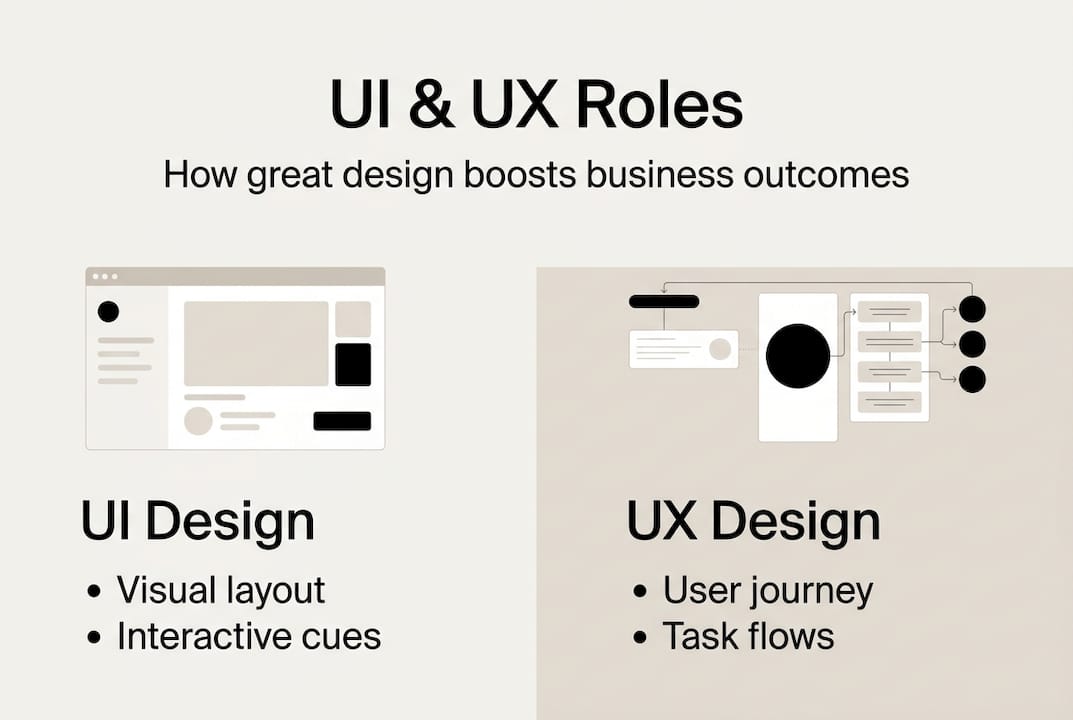
User Interface (UI) design focuses on the visual and interactive elements users encounter on your website. This includes color schemes, typography, button styles, icons, spacing, and all the graphical components that make up your site’s appearance. UI designers create the aesthetic framework that communicates your brand identity and guides users through each interaction point.
User Experience (UX) design takes a broader view, encompassing the entire journey users take when interacting with your digital product. UX designers conduct research to understand user needs, pain points, and behaviors. They map out user flows, create wireframes, and test prototypes to ensure the site solves real problems efficiently. While UI makes things look appealing, UX makes them work intuitively.
A professional debate exists within the design community about whether UI is a subset of UX or a distinct discipline. Some experts argue that visual interface design naturally falls under the umbrella of user experience since aesthetics impact how users feel about a product. Others maintain that UI and UX require different skill sets and should be treated as separate but collaborative specializations.
For business owners, this debate matters less than understanding the practical implications. Sequencing your design process correctly delivers better results. Starting with UX strategy before diving into UI execution prevents the common mistake of creating beautiful websites that frustrate users or fail to meet business objectives. A UI UX design agency in Dubai typically integrates both disciplines, ensuring visual appeal supports rather than undermines usability.
“Effective web design requires both disciplines working in harmony. UI without UX creates pretty but confusing sites. UX without UI creates functional but forgettable experiences.”
Consider these key distinctions:
- UI designers ask: What colors, fonts, and layouts will resonate with our brand?
- UX designers ask: What problems are users trying to solve when they visit our site?
- UI focuses on individual screen elements and micro-interactions
- UX focuses on overall flow, information architecture, and user goals
- UI deliverables include style guides and high-fidelity mockups
- UX deliverables include user personas, journey maps, and wireframes
Understanding UX design principles helps you evaluate whether your current website truly serves your audience or simply looks professional on the surface.
How UI/UX enhances web design performance and user experience
Responsive design has evolved from a nice-to-have feature to an absolute business necessity. With mobile devices accounting for 72% of web traffic in 2026, your site must adapt flawlessly across smartphones, tablets, and desktops. A responsive website Dubai businesses rely on adjusts layout, images, and navigation based on screen size, ensuring every visitor enjoys an optimized experience regardless of their device.

Accessibility compliance extends your reach while demonstrating social responsibility. Following WCAG (Web Content Accessibility Guidelines) ensures users with visual, auditory, motor, or cognitive disabilities can navigate your site effectively. This includes providing alt text for images, ensuring sufficient color contrast, enabling keyboard navigation, and structuring content with proper heading hierarchies. Accessibility improvements benefit all users, not just those with disabilities.
The user-centered design process involves multiple research and testing phases that validate decisions before launch. This methodology includes:
- Conducting user interviews and surveys to understand audience needs
- Creating personas representing your target customer segments
- Developing wireframes that map out content structure and navigation
- Building interactive prototypes for usability testing
- Iterating based on real user feedback before finalizing designs
- Implementing analytics to measure post-launch performance
Intuitive navigation reduces cognitive load, helping visitors find information quickly without confusion. Clear menu structures, logical page hierarchies, and consistent placement of key elements like search bars and contact buttons keep users oriented. Micro-interactions provide subtle feedback that confirms actions, such as button color changes on hover or loading animations that indicate processing.
Design thinking in web design incorporates these principles systematically, resulting in measurable business improvements. A recent case study documented a Dubai e-commerce site that implemented comprehensive UI/UX improvements, including streamlined checkout flows and personalized product recommendations. The redesign produced a 38% increase in conversion rates and a 42% reduction in task completion time.
Pro Tip: Prioritize mobile-first design and accessibility from your project’s inception rather than treating them as afterthoughts. Building these considerations into your initial wireframes costs less and produces better results than retrofitting them later.
| Design element | User impact | Business benefit |
|---|---|---|
| Responsive layouts | Seamless experience across devices | Higher mobile conversion rates |
| Clear navigation | Reduced bounce rates | More page views per session |
| Fast load times | Lower frustration | Improved SEO rankings |
| Accessible features | Inclusive user base | Expanded market reach |
| Intuitive forms | Higher completion rates | More qualified leads |
Following UI UX best practices Dubai web designers recommend ensures your investment in web design translates into tangible returns through improved user satisfaction and business metrics.
Designing for edge cases: avoiding usability cliffs
Edge cases represent the 1% of unusual user scenarios that many designers overlook during development. These include visitors accessing your site over slow 3G connections, users with screen readers or other assistive technologies, customers inputting unexpected data formats, and browsers with JavaScript disabled. While these situations may seem rare, neglecting edge cases creates usability cliffs that exclude significant user segments and damage your brand reputation.
The consequences of ignoring edge cases extend beyond poor user experience. A checkout form that breaks when users enter phone numbers with spaces or dashes loses sales. A site that becomes unusable without JavaScript alienates visitors in regions with unstable internet infrastructure. Images without alt text prevent visually impaired users from understanding your content. Each overlooked scenario represents lost business opportunities and potential legal liability in jurisdictions with strict accessibility requirements.
Progressive disclosure offers a strategic approach to handling long-tail UI complexity without overwhelming typical users. This technique reveals advanced features or detailed information only when users need them, keeping primary interfaces clean and focused. For example, a product page might show essential details upfront while hiding technical specifications behind an expandable section. This approach accommodates both casual browsers and detail-oriented researchers without cluttering the default view.
Designing for accessibility, slow networks, and diverse inputs early in your process costs significantly less than fixing problems post-launch. Consider these proactive strategies:
- Test your site with screen readers and keyboard-only navigation during development
- Implement lazy loading for images to improve performance on slow connections
- Validate form inputs flexibly, accepting multiple formatting styles for phone numbers and addresses
- Provide meaningful error messages that guide users toward successful completion
- Include loading states and progress indicators for operations that take time
- Design fallback experiences for features that require JavaScript or modern browser capabilities
Pro Tip: Simulate edge case scenarios during your testing phase by throttling your connection speed, disabling JavaScript, and using browser extensions that emulate screen readers. This hands-on approach reveals usability problems you might otherwise miss until real users complain.
“Future-proofing your website means designing for users you haven’t met yet, in situations you haven’t anticipated. Edge cases aren’t optional considerations, they’re opportunities to demonstrate your commitment to inclusive, resilient design.”
Applying UI UX best practices Dubai web designers advocate ensures your site remains functional and welcoming for all visitors, regardless of their circumstances or capabilities. This inclusive approach not only expands your potential audience but also builds trust with users who appreciate thoughtful, accessible design.
Applying UI and UX design strategically for Dubai SMBs’ online success
Dubai’s competitive business environment demands websites that convert visitors into customers efficiently. Small and medium-sized enterprises can implement strategic UI/UX improvements by following a structured approach that prioritizes user needs while aligning with business objectives. The key lies in sequencing your efforts correctly and measuring results at each stage.
Start with UX research to understand your target audience’s behaviors, preferences, and pain points. This foundation informs every subsequent design decision. Conduct competitor analysis to identify gaps in the market your website can fill. Create detailed user personas representing your ideal customers, including their goals, frustrations, and typical journey through your sales funnel. Map out current user flows to identify friction points where visitors abandon their tasks.
Once you understand your users, develop wireframes that structure content and navigation logically. These low-fidelity sketches focus on functionality rather than aesthetics, allowing you to test and refine the user experience before investing in visual design. Gather feedback from real users through prototype testing, iterating based on their input.
Only after validating your UX strategy should you move to UI design. Create a visual identity that reflects your brand personality while maintaining clarity and usability. Select color palettes that provide sufficient contrast for readability. Choose typography that works across devices and screen sizes. Design interactive elements that provide clear feedback and guide users toward desired actions.
Research comparing UI-only versus UX-led approaches reveals significant differences in business outcomes. Teams that prioritize UX strategy before UI execution consistently achieve better results across key metrics.
| Approach | User satisfaction | Conversion rate | Development cost | Time to market |
|---|---|---|---|---|
| UI-only focus | 62% positive | 2.3% average | Higher due to rework | Faster initially |
| UX-led design | 89% positive | 4.1% average | Lower overall | Longer upfront |
Follow these steps to implement effective UI/UX for your Dubai SMB:
- Audit your current website to identify usability problems and conversion bottlenecks
- Research your target audience through surveys, interviews, and analytics review
- Define clear business goals and user objectives your redesign must achieve
- Create wireframes and user flows that address identified pain points
- Test prototypes with real users before committing to visual design
- Develop UI elements that support rather than distract from user tasks
- Implement analytics and feedback mechanisms to measure post-launch performance
- Iterate continuously based on user behavior data and changing business needs
Partnering with experienced professionals accelerates this process while avoiding costly mistakes. A proven UI UX design agency in Dubai brings specialized expertise in both disciplines, ensuring your project benefits from integrated strategy rather than siloed execution. They understand local market dynamics and can tailor solutions to Dubai’s diverse, multilingual audience.
Exploring creative web design ideas specific to your industry provides inspiration while maintaining focus on user needs. Innovation should enhance usability, not complicate it. The most successful websites balance creativity with clarity, delivering memorable experiences that also drive measurable business results.
Investing in professional UX design in Dubai pays dividends through higher conversion rates, increased customer loyalty, and reduced support costs. Users who enjoy seamless, intuitive experiences return more frequently and recommend your business to others. Following a modern web design process ensures your investment delivers maximum return through strategic, user-centered development.
Enhance your website with expert UI/UX design services in Dubai
Transforming your website from a digital brochure into a conversion engine requires expertise in both UI and UX disciplines. Professional design services tailored for Dubai’s business landscape combine local market knowledge with proven methodologies that deliver measurable results. Whether you’re launching a new site or improving an existing one, partnering with specialists accelerates your path to online success.
Our UI UX design agency in Dubai brings over 20 years of experience creating websites that balance aesthetic appeal with functional excellence. We start every project with comprehensive user research, ensuring your site addresses real customer needs rather than assumptions. Our team develops creative web design ideas that differentiate your brand while maintaining the intuitive navigation and clear calls-to-action that drive conversions. From initial strategy through launch and ongoing optimization, we create responsive website Dubai businesses rely on to compete effectively in digital markets. Let’s discuss how strategic UI/UX improvements can boost your online presence and bottom line.
FAQ
What is the difference between UI and UX design?
UI design focuses on visual and interactive elements like colors, typography, buttons, and layouts that users see and click. UX design encompasses the entire user journey, including research, problem-solving, information architecture, and ensuring the site meets user needs efficiently. Some experts view UI as a subset of UX, while others treat them as distinct but collaborative disciplines that both contribute uniquely to effective web design.
How does responsive design impact user experience?
Responsive design adapts your website’s layout, images, and navigation to work seamlessly across smartphones, tablets, and desktop computers, eliminating the frustration of pinching, zooming, or horizontal scrolling. With mobile devices generating 72% of web traffic in 2026, responsive design directly impacts whether visitors can access your content easily or abandon your site for a competitor. This adaptability improves satisfaction, reduces bounce rates, and increases the likelihood visitors complete desired actions like purchases or contact form submissions.
Why is designing for edge cases important?
Designing for edge cases prevents usability cliffs that exclude users facing unusual but real scenarios like slow network connections, disabilities requiring assistive technologies, or unexpected data input formats. Neglecting these 1% situations creates barriers that damage your brand reputation and lose business opportunities. Future-proofing your website by accommodating diverse user circumstances demonstrates commitment to inclusive design while expanding your potential audience and reducing support costs from frustrated users encountering preventable problems.
How can Dubai SMBs start improving their website’s UI/UX?
Begin with UX research to understand your target audience’s behaviors, preferences, and pain points through surveys, interviews, and analytics review. Map current user journeys to identify friction points where visitors abandon tasks, then create wireframes addressing these problems before investing in visual design. Partner with local design experts who understand Dubai’s market dynamics and follow step-by-step modern web design practices that validate decisions through user testing before launch, ensuring your investment delivers measurable improvements in conversion rates and customer satisfaction.
Recommended
- UI UX Design Agency in Dubai – Web Design Dubai – Website Design Company Dubai | NetSoft
- 6 Essential UI UX Best Practices for Dubai Web Designers
- Design Thinking in Web Design – Web Design Dubai – Website Design Company Dubai | NetSoft
- UX Design in Dubai – Web Design Dubai – Website Design Company Dubai | NetSoft